 Preview Post
- October 24, 2026

I’ve spent quite a bit of time over the last year experimenting with Screaming Frog’s command-line interface, particularly around automating technical SEO data collection and finding ways to make better use of the hardware and tools I already have available.
Anyone who’s followed my recent experiments, or attended my talk at BrightonSEO in October, will probably have noticed that I’ve developed something of a fascination with Screaming Frog CLI. I genuinely think it’s one of the more underappreciated capabilities of an application that so many of us working in technical SEO use almost every day.
The more I’ve explored it, the more I’ve started thinking about how we can make it easier to use, particularly for people who are curious about automation but perhaps don’t want to spend their evenings wrestling with complicated command-line arguments.
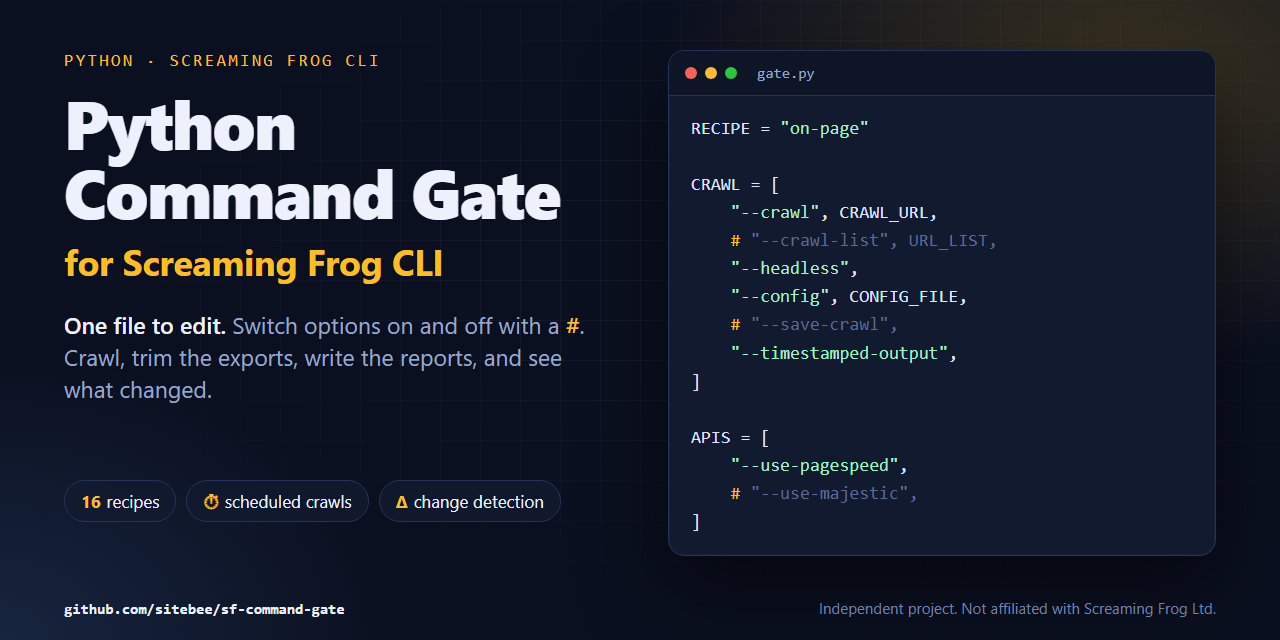
That thinking eventually led me to build something I’ve called Python Command Gate for Screaming Frog CLI, a small open-source project that I’ve recently published under my Sitebee GitHub account.
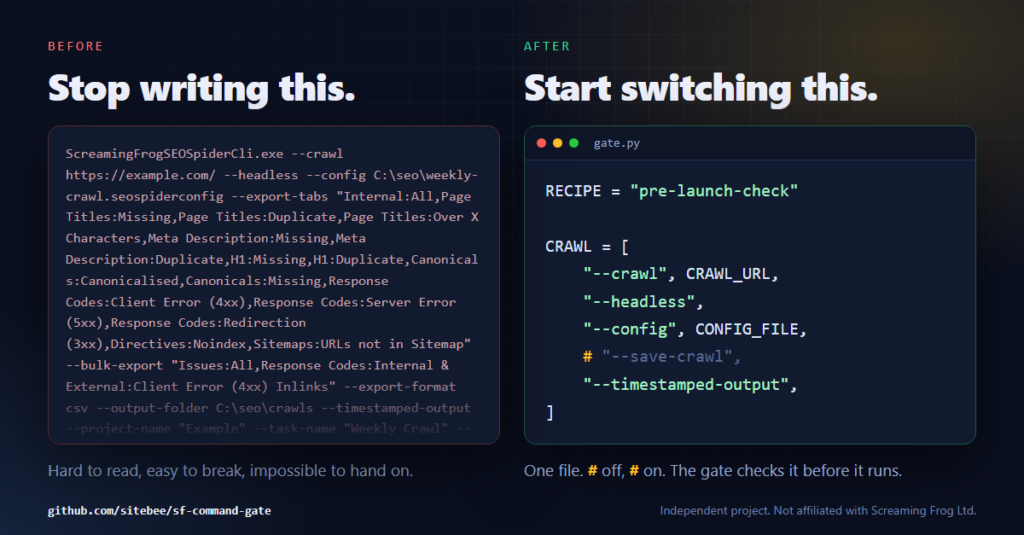
If you’ve spent any time working with Screaming Frog CLI, you’ll know that commands can become rather lengthy once you start adding configurations, export options, API integrations and output directories.
There’s nothing particularly wrong with this, and once you’ve become familiar with the available arguments it’s a perfectly reasonable way to control a crawl. However, when you’re dealing with multiple exports or trying to build something repeatable, those commands can quickly become difficult to read, maintain and troubleshoot.
I found myself spending time assembling command strings, checking arguments and occasionally revisiting documentation because I’d forgotten the exact name of an export or how a particular option needed to be structured.
It occurred to me that much of this could be simplified with a Python wrapper that handled the command construction behind the scenes, leaving me with something considerably easier to configure and reuse.
My original thinking was fairly straightforward. Rather than continually editing long CLI commands, what if I could open a Python file, switch the options I wanted on or off, and let the script handle everything else?
That became the starting point for Command Gate.
One of the decisions I made early on was that I didn’t want to introduce another complicated configuration system, particularly when the whole purpose of the project was to make an existing tool easier to work with.
Instead, I wanted a single Python file where the main settings were visible, reasonably self-explanatory and could be changed without having to understand everything happening underneath.
The approach I’ve taken is to use Python comments to enable or disable options, meaning you can switch functionality on or off simply by adding or removing a # character.
For example, a small section of the crawl configuration looks like this:
|
1 2 3 4 5 6 7 8 |
CRAWL = [ "--crawl", CRAWL_URL, # "--crawl-list", URL_LIST, "--headless", "--config", CONFIG_FILE, # "--save-crawl", ] |
There’s no need to assemble the final command yourself because the wrapper takes care of that, validates the configuration and passes the appropriate arguments to Screaming Frog.
I’ve also included a dry-run option, which checks the configuration and shows the command that would be executed without actually starting a crawl. This is particularly useful when you’re experimenting with new configurations and don’t fancy discovering a mistake twenty minutes into a crawl.
I spent quite a bit of time mapping Screaming Frog’s available exports and columns too, allowing the wrapper to catch invalid names and offer suggestions before anything starts running.
It’s a relatively simple idea, but I’ve found that removing these little points of friction makes experimenting with CLI considerably more enjoyable.
As I continued developing the wrapper, I started thinking about how I could make the output more useful, especially when I only needed a particular collection of technical SEO data rather than everything Screaming Frog was capable of exporting.
This led to the introduction of recipes, which are predefined collections of exports and columns designed around different areas of technical SEO.
For example, if I’m interested in investigating hreflang implementation, I can use the international recipe rather than manually configuring every relevant export. Equally, if I’m looking at internal linking, indexability, redirects or structured data, I can select a recipe appropriate to that particular task.
The repository currently includes recipes covering areas such as on-page elements, indexability, redirects, internal architecture, images, international SEO and structured data, alongside the ability to create your own configurations.
Each recipe also controls which columns are retained, allowing the preprocessing stage to produce smaller, more manageable datasets rather than carrying unnecessary information through every subsequent step.
That’s particularly important when you’re dealing with larger websites, where some of Screaming Frog’s bulk exports can become enormous.
I’ve deliberately made the recipes editable because every website is different, and I don’t think there’s much value in forcing everybody to work with the same selection of data.
One example I’m particularly pleased with is the international recipe, which can collect the hreflang information I need for further analysis, including work with the hreflang matrix functionality I’ve previously developed for my Chrome extension.
It’s quite satisfying when separate experiments start fitting together.
Although the original purpose was simply to make CLI commands easier to manage, the project has gradually developed into something a little more useful for the type of automation work I’m interested in.
One of the biggest opportunities I see with Screaming Frog CLI is the ability to move beyond individual crawls towards repeatable data collection, where the same information can be gathered at regular intervals without having to manually open the application each time.
Command Gate has been designed with this in mind, producing timestamped output folders, structured CSV exports and JSON reports that can be used by other applications or automation workflows.
I’ve also introduced change detection, which allows the results of a crawl to be compared against previous runs, helping identify things such as newly discovered errors, canonical changes, pages becoming non-indexable and issues that have appeared or been resolved.
For me, this is where things start getting particularly interesting because collecting data consistently over time creates opportunities that simply aren’t available from a single crawl.
You can begin identifying patterns, tracking technical changes and building systems that surface information when something important happens, rather than relying entirely on somebody remembering to run another crawl.
I’ve also added an optional resource profiler for Windows, which records information about CPU, memory, network usage and crawl duration. This grew out of another question I’ve been exploring recently around understanding how much computing power a crawl actually requires, particularly when you’re thinking about running scheduled processes on smaller or refurbished machines.
The important distinction, though, is that I’m concentrating on automated technical SEO data collection, rather than claiming to have built something that replaces an experienced technical SEO practitioner.
Collecting the right data and making it accessible is one challenge, but interpreting that information in the context of a particular website, business or technical environment is another matter entirely.
Another reason I’ve become increasingly interested in Screaming Frog CLI is how naturally it fits into the wider automation ecosystem.
I’ve spent a fair amount of time experimenting with Python, n8n and large language models, particularly around how they can be combined to create processes that are repeatable and relatively inexpensive to operate.
Screaming Frog can handle the crawling and data collection, Python can deal with preprocessing and organising the output, and an orchestration tool such as n8n can control when those processes happen and what should happen with the resulting information.
Command Gate sits between those components by providing a consistent way to execute crawls and produce structured results that other tools can consume.
This also becomes interesting when thinking about the direction we’re heading with agentic systems, where software agents may eventually need to request specific datasets, execute predefined processes or inspect changes without manually interacting with a graphical interface.
I think there’s a lot of potential here, particularly if we can give those systems reliable, predictable tools rather than expecting them to figure everything out from scratch.
That doesn’t mean every crawl needs an AI model involved, and in many cases a straightforward scheduled Python script will do the job perfectly well. I’ve become increasingly convinced that getting the deterministic parts of an automation working properly is far more valuable than introducing an agent simply because you can.
For the moment, Command Gate is intended to provide some of those foundations, leaving people free to decide how they want to use the data afterwards.
I’ve built quite a few small applications, scripts and experiments over the years, although many of them have remained on my own machines because they were created to solve a particular problem I was working on.
With Command Gate, I thought it would be worth sharing something with the wider technical SEO community, particularly after the conversations I had at BrightonSEO with people who were interested in exploring Screaming Frog CLI themselves.
The project is intentionally aimed at people who are curious, enjoy tinkering and want to see what they can achieve with tools they may already have access to.
It’s not intended to become an enormous software platform, and I have no plans to turn it into a commercial product or continually add features for the sake of adding them.
The public repository is the framework I’ve chosen to share, with my own more specialised configurations, experiments and automation workflows remaining separate. I’ll continue maintaining the project, fixing bugs and improving the available recipes where it makes sense, but I want to keep the underlying concept relatively simple.
There’s also something quite nice about putting a project out there knowing that somebody else might take it in a direction you hadn’t considered, or use it to solve a problem entirely different from the one that prompted you to build it.
I’ve published Python Command Gate for Screaming Frog CLI on GitHub, along with documentation, example recipes and instructions for getting started.
View Python Command Gate on GitHub
You’ll need a licensed copy of Screaming Frog SEO Spider and Python 3.9 or newer, but beyond that the idea is to keep things as accessible as possible.
The framework was developed and tested on Windows Server 2025, although most of the functionality uses standard Python and has been written with macOS and Linux in mind too. Those platforms haven’t yet had the same level of testing, so feedback from anyone experimenting with them would be particularly welcome.
If you’re interested in Screaming Frog CLI, automated technical SEO data collection or simply enjoy experimenting with Python, hopefully you’ll find something useful in the repository.
I’m rather chuffed with how it’s turned out, especially considering that the whole thing started with a relatively simple frustration about writing long command-line arguments.
There’s still plenty I want to explore around technical SEO data collection and automation, although not necessarily as part of this public project, and I’m looking forward to sharing more of those experiments as they develop.
For now, if this encourages a few more technical SEO practitioners to open a terminal and discover what Screaming Frog CLI is capable of, I’ll consider that a pretty good result.


Discussion
This discussion lives in the forum. Replies appear here and in the thread.
No replies yet. Start the discussion in the forum.