I've wanted a proper connection between my WordPress blog and XenForo forum for a long time. WordPress is where I write the articles, but XenForo is a much better place for an ongoing conversation. Running a separate WordPress comment section beside a forum always felt like asking people to have the same discussion twice.
I recently put together a small bridge between the two. Publishing a blog post now creates a matching thread in a dedicated forum area. The thread contains a short excerpt and a link back to the full article. People reply in XenForo, and those replies also appear beneath the WordPress post.
This is a guide to the approach and the decisions behind it, rather than a claim that you can paste one PHP snippet into any installation and be finished. WordPress and XenForo both have their own permissions, templates, caching and indexing behaviour. Those details matter.
The article should remain the article. I did not want to copy the full post into XenForo, maintain two versions of it, or ask readers to choose between two comment sections. I wanted WordPress to own the editorial content and XenForo to own the discussion.
The result is fairly simple from a reader's point of view: read on the blog, see the replies there, and go to the forum if you want to join in. If you discover the thread in the forum first, the opening post gives you enough context and sends you back to the full article.
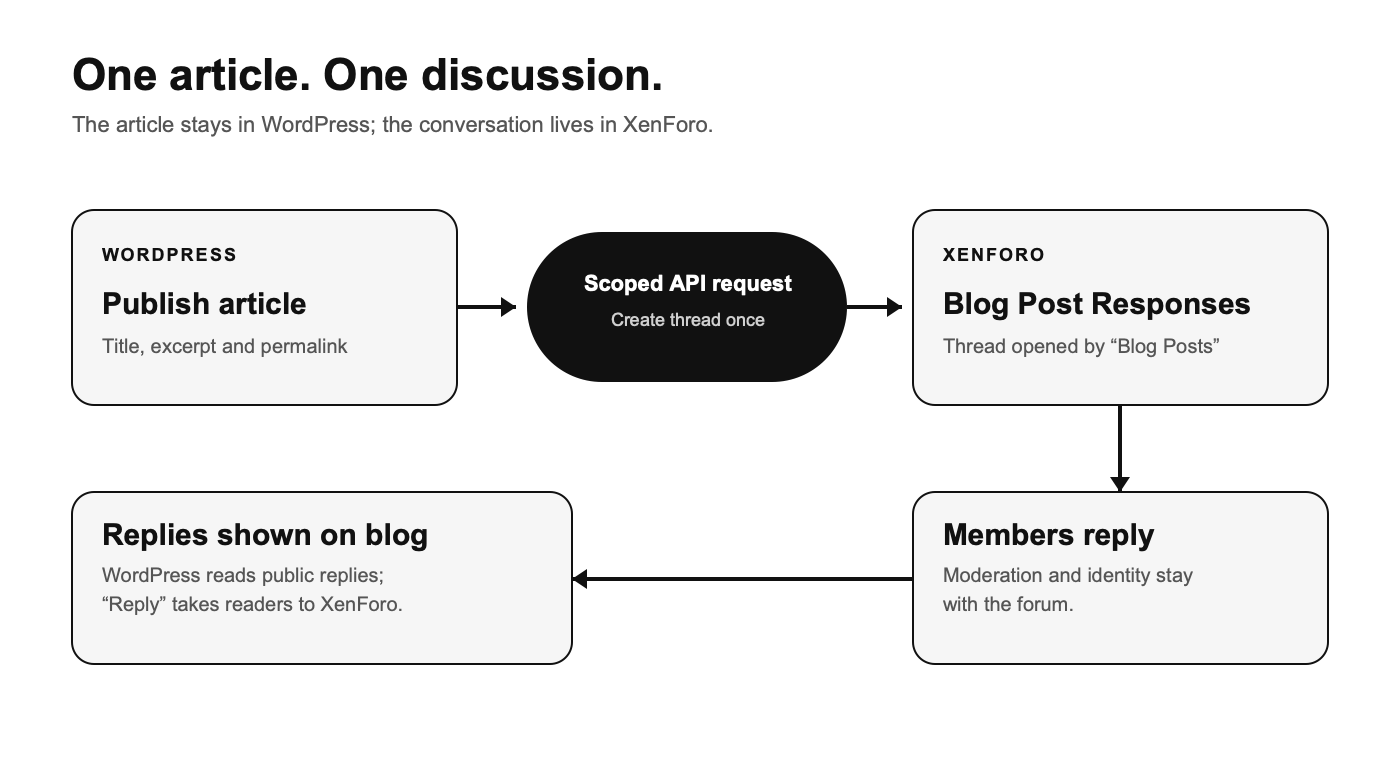
In my setup, both applications are on the same domain, with WordPress under the main site and XenForo under /forum/. The bridge itself is a small WordPress plugin using XenForo's API. It is not an iframe, a second WordPress comments database, or a copy of the article posted into the forum.
I created a XenForo forum called Blog Post Responses. That separation is important. It gives these automatically created threads a predictable home and makes it possible to apply different indexing rules without affecting the rest of the forum.
The opening threads are posted by a generic account called “Blog Posts”, rather than by my personal account. That is more honest about what is happening: the account is publishing a pointer to a blog article automatically, not pretending that I sat down and opened a forum discussion by hand. Members' replies still appear under their own forum identities.
I also removed the large inline “create thread” box from that node and added an introductory sticky explaining what the area is for. That is a usability choice, not a security control. Hiding a composer does not revoke anyone's permission to create a thread. If you need to enforce that, use XenForo permissions while making sure the dedicated API account can still create the bridge threads.
The WordPress side listens for a post being inserted and checks that it has just moved into the published state. It also checks for a stored XenForo thread ID. If one is already attached, it does not create another thread when I edit the article later.
Here is the shape of that check, shortened to show the important part:
The actual plugin does more than this. It uses a short-lived lock, records failed attempts, schedules retries and checks for a thread it may already have created before retrying. That last point is easy to overlook. If the API creates a thread but PHP stops before WordPress saves the returned ID, blindly trying again can create a duplicate.
WordPress stores the successful thread ID in post meta. That one mapping is the key to the rest of the bridge: the blog post knows which forum thread to display, and older posts can be linked to an existing thread manually through a small editor field.
I kept the opening post deliberately short: the article title becomes the thread title, and the body contains a trimmed excerpt, the full article URL and an invitation to reply. It gives the forum a useful starting point without turning the forum thread into another version of the blog post.
The write request uses XenForo's thread API. In simplified form:
This is illustrative, not the whole plugin. In particular, you need to validate the response, store the returned thread ID, handle failures and stop a retry from creating the same thread twice.
The API key for thread creation belongs to the dedicated “Blog Posts” user and is restricted to thread writing. A separate read key is used when WordPress fetches replies. Both keys live in files outside the public web root with restricted permissions. They are not embedded in a theme file or exposed to JavaScript. The requests use HTTPS with certificate verification, and WordPress does not follow redirects when making them.
The forum remains the source of truth for comments. When someone replies, the reply is saved and moderated by XenForo. WordPress reads the public thread and displays its replies beneath the article; it does not insert a second copy of every reply into the WordPress comments table.
The read request asks XenForo for the thread with its posts:
The renderer skips the opening post, because that is the article pointer rather than a reader comment. It checks that the returned thread is visible, limits the response size, sanitises parsed reply HTML with WordPress's allowed post HTML, and escapes names, dates and URLs before output. It also keeps forum links on the site's own /forum/ path rather than trusting arbitrary URLs from a response.
I cache the read result briefly so every blog page view does not turn into an immediate XenForo API request. The page also refreshes the discussion after load, which helps when a full-page cache has served older HTML. There is a small delay before a new reply appears on the blog; the forum itself is always the live conversation. Pagination is handled on the blog side for longer discussions.
The “Reply in the forum” link is intentional. I did not try to reproduce XenForo's login, editor, spam controls and moderation workflow inside WordPress. Readers can see the conversation with the article, but they post through the system that actually owns it.
The most important SEO choice was deciding which URL should be the search result for the article. For me, that is the WordPress post. It contains the complete piece, its own canonical URL, and sits in the WordPress post sitemap. The forum response thread contains only a short excerpt and a link back.
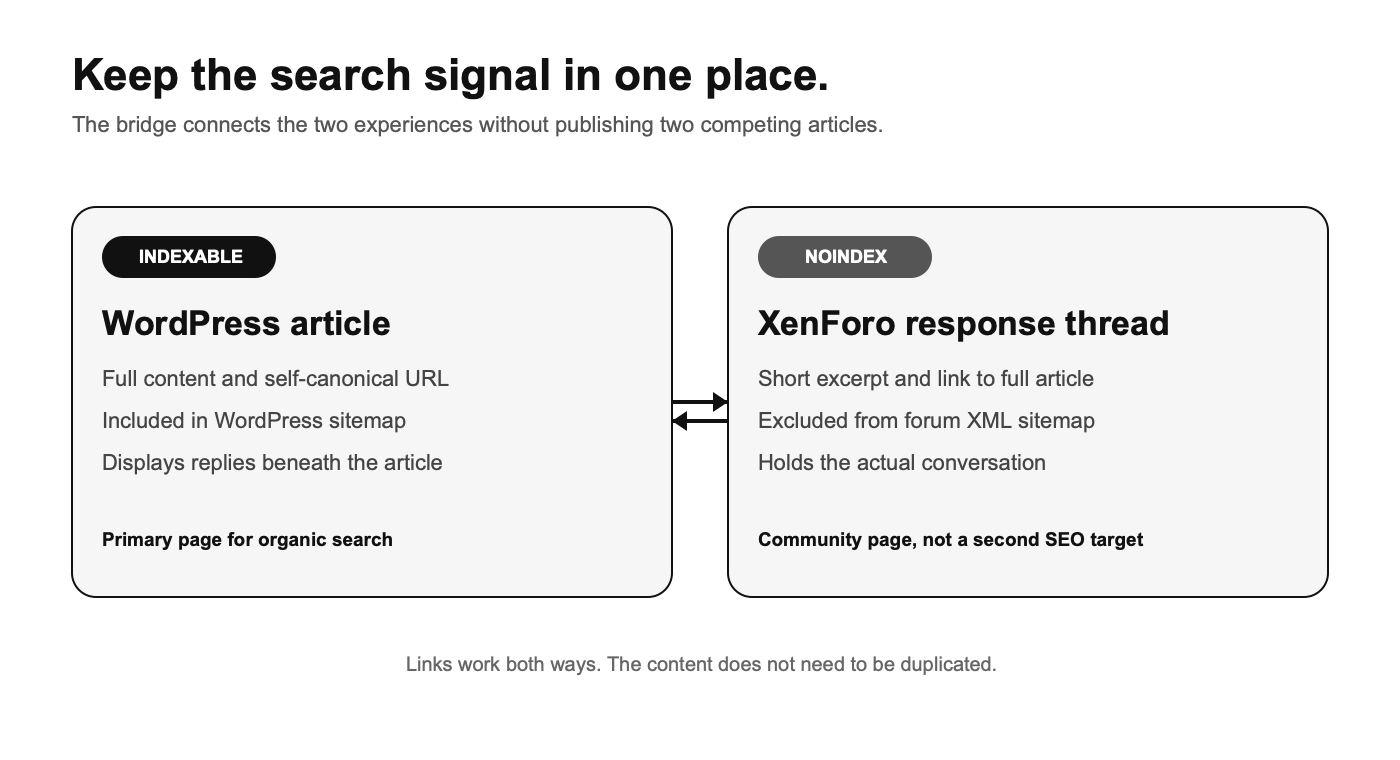
I set the Blog Post Responses node to noindex in XenForo. Its threads inherit that setting and are kept out of the forum XML sitemap. The rest of the forum can still be indexed normally; this is a specific rule for a node whose purpose is to support blog articles, not a judgement that forum discussions have no SEO value.
I would not solve this by blocking the response threads in robots.txt. A crawler needs to be able to fetch a URL to see its noindex directive. Nor would I rely on simply placing a link back to WordPress and hoping Google works out which page I prefer. The explicit indexing rule makes the ownership much clearer.
There is a trade-off: a particularly useful response thread will not become its own search landing page. I am comfortable with that for this node. If a discussion grows into a genuinely independent resource, I would move it out of the bridge area or publish a separate, edited article rather than quietly let two near-identical URLs compete.
Showing the replies beneath the WordPress article can add useful context for readers, but it also means moderation matters. Spam, irrelevant links and low-quality replies are not magically improved because they are technically hosted in XenForo. The forum's moderation controls are part of the SEO plan, not just a community feature.
I tested a fresh publication, edits to the same post, a failed API attempt, the thread's author, the excerpt and return link, and the way replies appear on both sides. I also checked the forum node's indexing setting, the inherited behaviour of its existing threads, and the sitemap treatment. Those checks catch more real problems than simply seeing one comment appear once.
If you build something similar, also test the awkward cases: an API timeout after XenForo has actually created the thread, a deleted or private thread, a reply that has been edited or moderated, and a blog page being served from cache. The bridge should fail gracefully and leave the article readable even when the forum is temporarily unavailable.
This setup is deliberately narrow. It is a bridge for blog discussions, not a complete WordPress/XenForo account sync or a replacement for XenForo. That is probably why I like it: each system still does the job I chose it for, and readers no longer have to think about where the comments went.
I recently put together a small bridge between the two. Publishing a blog post now creates a matching thread in a dedicated forum area. The thread contains a short excerpt and a link back to the full article. People reply in XenForo, and those replies also appear beneath the WordPress post.
This is a guide to the approach and the decisions behind it, rather than a claim that you can paste one PHP snippet into any installation and be finished. WordPress and XenForo both have their own permissions, templates, caching and indexing behaviour. Those details matter.
What I wanted the two systems to do
The article should remain the article. I did not want to copy the full post into XenForo, maintain two versions of it, or ask readers to choose between two comment sections. I wanted WordPress to own the editorial content and XenForo to own the discussion.
The result is fairly simple from a reader's point of view: read on the blog, see the replies there, and go to the forum if you want to join in. If you discover the thread in the forum first, the opening post gives you enough context and sends you back to the full article.
In my setup, both applications are on the same domain, with WordPress under the main site and XenForo under /forum/. The bridge itself is a small WordPress plugin using XenForo's API. It is not an iframe, a second WordPress comments database, or a copy of the article posted into the forum.
Start with a dedicated forum node
I created a XenForo forum called Blog Post Responses. That separation is important. It gives these automatically created threads a predictable home and makes it possible to apply different indexing rules without affecting the rest of the forum.
The opening threads are posted by a generic account called “Blog Posts”, rather than by my personal account. That is more honest about what is happening: the account is publishing a pointer to a blog article automatically, not pretending that I sat down and opened a forum discussion by hand. Members' replies still appear under their own forum identities.
I also removed the large inline “create thread” box from that node and added an introductory sticky explaining what the area is for. That is a usability choice, not a security control. Hiding a composer does not revoke anyone's permission to create a thread. If you need to enforce that, use XenForo permissions while making sure the dedicated API account can still create the bridge threads.
Create one thread when the article is first published
The WordPress side listens for a post being inserted and checks that it has just moved into the published state. It also checks for a stored XenForo thread ID. If one is already attached, it does not create another thread when I edit the article later.
Here is the shape of that check, shortened to show the important part:
PHP:
add_action('wp_after_insert_post', function ($post_id, $post, $update, $before) {
    if ($post->post_type !== 'post' || $post->post_status !== 'publish') {
        return;
    }

    if ($before && $before->post_status === 'publish') {
        return; // An edit to an existing published article.
    }

    if (get_post_meta($post_id, '_clfc_thread_id', true)) {
        return; // This article already has a forum thread.
    }

    // Create the XenForo thread and save its returned thread ID.
}, 20, 4);
The actual plugin does more than this. It uses a short-lived lock, records failed attempts, schedules retries and checks for a thread it may already have created before retrying. That last point is easy to overlook. If the API creates a thread but PHP stops before WordPress saves the returned ID, blindly trying again can create a duplicate.
WordPress stores the successful thread ID in post meta. That one mapping is the key to the rest of the bridge: the blog post knows which forum thread to display, and older posts can be linked to an existing thread manually through a small editor field.
What goes into the forum thread
I kept the opening post deliberately short: the article title becomes the thread title, and the body contains a trimmed excerpt, the full article URL and an invitation to reply. It gives the forum a useful starting point without turning the forum thread into another version of the blog post.
The write request uses XenForo's thread API. In simplified form:
PHP:
$response = wp_safe_remote_post(home_url('/forum/api/threads/'), [
    'timeout'     => 15,
    'redirection' => 0,
    'sslverify'   => true,
    'headers'     => [
        'Accept'     => 'application/json',
        'XF-Api-Key' => $write_key, // Loaded server-side, never sent to the browser.
    ],
    'body' => [
        'node_id' => $forum_id,
        'title'   => wp_strip_all_tags(get_the_title($post)),
        'message' => $excerpt . "\n\nFull article: " . get_permalink($post),
    ],
]);
This is illustrative, not the whole plugin. In particular, you need to validate the response, store the returned thread ID, handle failures and stop a retry from creating the same thread twice.
The API key for thread creation belongs to the dedicated “Blog Posts” user and is restricted to thread writing. A separate read key is used when WordPress fetches replies. Both keys live in files outside the public web root with restricted permissions. They are not embedded in a theme file or exposed to JavaScript. The requests use HTTPS with certificate verification, and WordPress does not follow redirects when making them.
Bring the replies back to WordPress
The forum remains the source of truth for comments. When someone replies, the reply is saved and moderated by XenForo. WordPress reads the public thread and displays its replies beneath the article; it does not insert a second copy of every reply into the WordPress comments table.
The read request asks XenForo for the thread with its posts:
PHP:
$url = add_query_arg(
    ['with_posts' => 1, 'page' => $page],
    home_url('/forum/api/threads/' . $thread_id . '/')
);

$response = wp_safe_remote_get($url, [
    'timeout'     => 6,
    'redirection' => 0,
    'sslverify'   => true,
    'headers'     => ['XF-Api-Key' => $read_key],
]);
The renderer skips the opening post, because that is the article pointer rather than a reader comment. It checks that the returned thread is visible, limits the response size, sanitises parsed reply HTML with WordPress's allowed post HTML, and escapes names, dates and URLs before output. It also keeps forum links on the site's own /forum/ path rather than trusting arbitrary URLs from a response.
I cache the read result briefly so every blog page view does not turn into an immediate XenForo API request. The page also refreshes the discussion after load, which helps when a full-page cache has served older HTML. There is a small delay before a new reply appears on the blog; the forum itself is always the live conversation. Pagination is handled on the blog side for longer discussions.
The “Reply in the forum” link is intentional. I did not try to reproduce XenForo's login, editor, spam controls and moderation workflow inside WordPress. Readers can see the conversation with the article, but they post through the system that actually owns it.
The SEO decision: one primary article URL
The most important SEO choice was deciding which URL should be the search result for the article. For me, that is the WordPress post. It contains the complete piece, its own canonical URL, and sits in the WordPress post sitemap. The forum response thread contains only a short excerpt and a link back.
I set the Blog Post Responses node to noindex in XenForo. Its threads inherit that setting and are kept out of the forum XML sitemap. The rest of the forum can still be indexed normally; this is a specific rule for a node whose purpose is to support blog articles, not a judgement that forum discussions have no SEO value.
I would not solve this by blocking the response threads in robots.txt. A crawler needs to be able to fetch a URL to see its noindex directive. Nor would I rely on simply placing a link back to WordPress and hoping Google works out which page I prefer. The explicit indexing rule makes the ownership much clearer.
There is a trade-off: a particularly useful response thread will not become its own search landing page. I am comfortable with that for this node. If a discussion grows into a genuinely independent resource, I would move it out of the bridge area or publish a separate, edited article rather than quietly let two near-identical URLs compete.
Showing the replies beneath the WordPress article can add useful context for readers, but it also means moderation matters. Spam, irrelevant links and low-quality replies are not magically improved because they are technically hosted in XenForo. The forum's moderation controls are part of the SEO plan, not just a community feature.
What I would check before calling it finished
I tested a fresh publication, edits to the same post, a failed API attempt, the thread's author, the excerpt and return link, and the way replies appear on both sides. I also checked the forum node's indexing setting, the inherited behaviour of its existing threads, and the sitemap treatment. Those checks catch more real problems than simply seeing one comment appear once.
If you build something similar, also test the awkward cases: an API timeout after XenForo has actually created the thread, a deleted or private thread, a reply that has been edited or moderated, and a blog page being served from cache. The bridge should fail gracefully and leave the article readable even when the forum is temporarily unavailable.
This setup is deliberately narrow. It is a bridge for blog discussions, not a complete WordPress/XenForo account sync or a replacement for XenForo. That is probably why I like it: each system still does the job I chose it for, and readers no longer have to think about where the comments went.